Winter Birds and Foliage: A Designer’s Guide to Getting It Right First Time
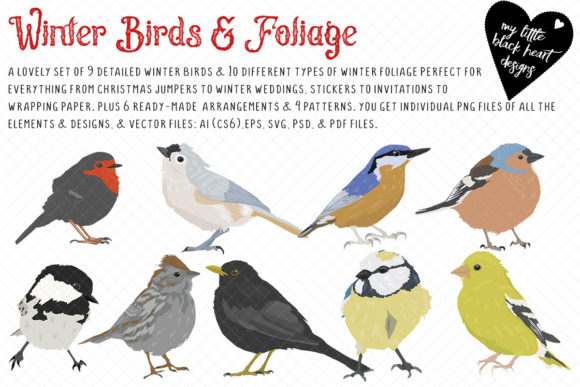
If you have ever tried to create a winter-themed design from scratch, you already know how quickly it can go sideways. The proportions feel off. The leaves look generic. The birds seem disconnected from the foliage. That is exactly why a resource like Winter Birds and Foliage exists. It gives you a curated library of nine distinct birds, ten different foliage and berry types, plus six ready-made designs and four patterns, all in multiple file formats including PNG, AI, EPS, PDF, and SVG. On paper, it sounds like a dream. In practice, how you approach it makes the difference between a cohesive product line and a messy collection of mismatched elements.
Whether you are designing for T-shirts, Christmas jumpers, fabric, gift wrap, winter wedding stationery, seasonal cards, apparel, stickers, or other products, the same pitfalls tend to surface. The good news is that most of them are easy to avoid once you know what to look for. Let’s walk through the common mistakes, the overlooked details, and the better habits that will save you time, frustration, and wasted effort.
The Mistake of Ignoring File Formats Until It Is Too Late
One of the most frequent misunderstandings about design bundles is assuming that all file types serve the same purpose. When you download Winter Birds and Foliage, you get PNG files, vector files (AI Illustrator CS6, EPS, PDF, SVG), and pattern plus symbol libraries. Each format has a specific job, and using the wrong one for your project can degrade quality or create extra work.
A common error is opening a PNG in a word processor and scaling it up, which results in pixelation. Another is opening an SVG in a raster editor and losing the vector benefits entirely. The practical solution is simple: decide your output medium first. If you are printing on fabric or creating large-format designs, reach for the vector files. If you are mocking up digital previews or social media graphics, the PNG files will serve you well. The symbol libraries in particular are often underused. They allow you to drag and drop elements without breaking the original, which is invaluable when you are iterating multiple product variations.
Before you start, take five minutes to confirm your software can handle the format you plan to use. Most modern graphic editing programs handle SVG and AI without issue, but older versions may need the EPS or PDF fallback. Checking this ahead of time prevents the frustration of downloading, unzipping, and discovering you cannot open the file.
Overlooking the Value of Named Elements
Every bird and foliage piece in this collection is named based on the real plant or bird it represents. At first glance, that might seem like a minor detail. In practice, it is one of the most useful features for keeping your workflow organized.
Beginners sometimes treat all leaves as interchangeable. Professionals know that using a correctly identified holly branch versus a generic berry stem changes how the design reads. If you are creating winter wedding stationery, for example, you might want ivy and mistletoe for their traditional associations. For a Christmas jumper, you might lean toward holly and pine. The names remove the guesswork. Do not ignore them. Use the symbol library to preview which combinations work together before you commit to a layout.
A better approach is to open the pattern libraries and symbol sets early in your process. Spend ten minutes browsing the named elements. You will often spot a combination you had not considered, and that alone can improve the final design significantly.
Treating the Ready-Made Designs as Final, Not Flexible
The six ready-made designs included in Winter Birds and Foliage are fully usable as they are. That is a great time-saver. The mistake people make, however, is treating them as fixed compositions rather than starting points.
If you apply a ready-made design to a product without adjusting scale, orientation, or color balance, you risk a result that feels generic or poorly fitted to the item. A design that looks balanced on a flat screen may feel cramped on a T-shirt pocket or too sparse on a large wrapping paper sheet. The fix is straightforward: open the vector version, duplicate the design, and experiment with resizing or repositioning individual elements. Because the pieces are all separate, you can move a bird closer to a berry cluster or rotate a foliage stem without rebuilding from scratch.
The four patterns are equally flexible. Pattern files are often used as fills or backgrounds, but you can also extract individual repeats to create custom layouts. Do not limit yourself to using them only as seamless repeats. Break them apart and see what happens.
Underestimating the Importance of Foliage and Bird Pairing
The ten foliage types and nine birds in this set were chosen to work together, but that does not mean any bird goes with any branch. A common oversight is combining elements that clash in scale, season, or visual weight. A large bird perched on a delicate berry stem looks unbalanced. A tiny bird lost among heavy pine branches feels disconnected.
Take the time to pair each bird with foliage that complements its size and posture. The named elements help here again. If you know the bird is a robin and the foliage is holly, you are working with a classic winter combination that audiences instantly recognize. If you pair a less common bird with a less common berry, the result can feel fresh and artistic, but you should check that the visual weight matches. Use the symbol library to test pairs quickly. This step alone will elevate your designs from amateur to polished.
Forgetting About Color Consistency Across Products
One of the biggest frustrations for small business owners and entrepreneurs is when the same design looks different on a sticker versus a fabric print versus a digital mockup. Winter Birds and Foliage provides elements in clean vector form, but color reproduction depends on your output method.
The mistake is assuming that what you see on screen is exactly what will print. RGB screens display colors differently from CMYK printers. If you are designing for print, convert your color mode early. The vector files give you full control over fill and stroke colors, so you can adjust saturation and brightness to match your production process. The PNG files are great for digital use, but do not rely on them for final print proofs.
A better habit is to create a small test print or digital proof with a single bird and foliage pair before you produce a full run. This catches color shifts early and saves you from wasting materials on a misaligned palette.
Neglecting to Check Element Compatibility With Your Software
The bundle includes AI Illustrator CS6, EPS, PDF, and SVG files, plus the pattern and symbol libraries. Most modern graphic design programs will open at least one of these formats. But there is a difference between opening a file and being able to edit it efficiently.
Some programs handle symbol libraries poorly, flattening them into static groups. Others struggle with PDF layers. Before you purchase or download, check whether your software supports embedded libraries. If you use a program like Affinity Designer, Inkscape, or CorelDRAW, the SVG and EPS files are usually the safest bet. If you use Adobe Illustrator, the AI files and symbol libraries will give you the most flexibility. The PNG files work for everyone, but you lose the ability to edit individual elements.
If you are a beginner, start with the PNG files for mockups and practice compositions. Once you feel comfortable, move to the vector files for final production work. This gradual approach prevents frustration and builds confidence.
Using Too Many Elements in One Design
Because Winter Birds and Foliage provides nine birds and ten foliage types, it is tempting to include as many as possible in a single design. This almost always leads to visual clutter. A T-shirt or Christmas jumper needs a focal point. A greeting card benefits from breathing room. Gift wrap can handle more repetition, but even there, balance matters.
A practical rule of thumb is to start with one bird and two foliage types. Build your composition around that core. If the design feels sparse, add one more foliage element. The ready-made designs in the bundle are excellent examples of restraint. Study them. Notice how each uses negative space and how the bird remains the anchor. Emulate that approach rather than fighting against it.
For patterns, limit yourself to three or four repeated elements. Too many distinct pieces in a pattern create visual noise that distracts from the overall impression. The four included patterns show you exactly how to do it well. Use them as templates for your own combinations.
Overlooking the Potential for Non-Christmas Winter Designs
The collection is called Winter Birds and Foliage, not Christmas Birds and Foliage. One of the most common missed opportunities is using it only for holiday products. The birds and foliage in this set include species and plants that are native to winter landscapes beyond Christmas. That makes them ideal for seasonal cards, winter wedding stationery, January apparel, and even educational or nature-themed projects.
If you limit yourself to red and green color schemes, you miss the chance to reach customers looking for quieter, more elegant winter aesthetics. Silver, white, deep blue, and muted green palettes work beautifully with these elements. The vector files make it easy to adjust colors globally, so do not be afraid to rebrand the same bird and foliage pair for multiple seasons or occasions.
A designer who creates a mistletoe and robin composition in soft grey and cream can sell that as a winter wedding invitation in January, then reuse the same elements in red and green for Christmas cards in December. That is efficient and smart.
Final Checks Before You Start Designing
Before you open any file, ask yourself a few practical questions. What product am I designing for? What format does that product require? Do I have the right software to edit vector files if needed? How many elements do I truly need in this composition? And perhaps most importantly, have I looked at the ready-made designs and patterns first to understand the creative possibilities?
Spending a few minutes answering these questions will save you hours of rework later. The Winter Birds and Foliage bundle is built to be flexible, organized, and production-ready. The better you understand how to navigate its parts, the more value you will get from it. Use the named elements, the symbol libraries, and the patterns as they are intended, and you will produce designs that feel intentional, cohesive, and professional across whatever products you choose to create.