Garden Flower Set: A Practical Design Resource for Creative Workflows
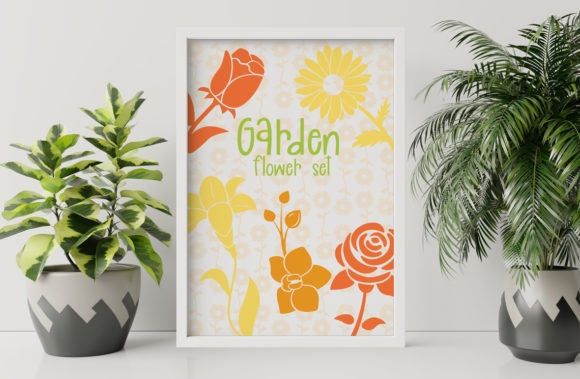
Whether you are a graphic designer building a brand identity, a small business owner preparing seasonal marketing materials, or a hobbyist who enjoys crafting digital art, having a reliable, high-quality set of floral illustrations can save time and elevate your output. The Garden Flower Set delivers exactly that: five illustrations and two patterns featuring roses, a lily, a sunflower, and an orchid. It comes in PNG, SVG, EPS, DXF, and AI formats, making it compatible with nearly every design tool and workflow you already use. Before you spend money on a fresh bouquet that will wilt in a week, consider investing in a digital set that you can use again and again across multiple projects.
What the Garden Flower Set Offers and Where It Fits in Your Process
This set is not just a collection of pretty images. It is a curated group of assets that can serve different roles depending on your project stage. Each illustration is a standalone element, while the two patterns give you ready-to-use backgrounds or fill textures. The included formats—PNG for quick web use, SVG and EPS for scalable vector editing, DXF for cutting machines, and AI for native Adobe Illustrator work—mean you can integrate these assets into print, digital, and physical production workflows without conversion headaches.
Before a Project: Planning and Asset Preparation
When you are in the planning phase of a creative project, you often need to gather visual references or test design directions. The Garden Flower Set can be used here as a mood board component. Drop the SVG versions into a prototype to see how floral elements look with your color palette and typography. Because the files are vector-based (SVG, EPS, AI), you can adjust sizes, recolor petals, or isolate individual flowers without losing quality. This flexibility helps you decide early whether a floral theme works for your client’s packaging, a wedding invitation suite, or a seasonal social media campaign.
If you run a print-on-demand business, you might use the DXF files to test cut paths on your vinyl cutter or Cricut machine before you commit to a production run. Testing with these files during the planning stage lets you check scale, alignment, and material compatibility before you place an order for physical goods.
During a Project: Integration with Design Tools and Workflows
Once your project moves into execution, the Garden Flower Set becomes a time-saving asset. Instead of drawing flowers from scratch or searching stock libraries for royalty-free images that may not fit your composition, you have a consistent set ready to import.
- Adobe Illustrator users can open the AI file directly and access all layers and paths. This allows you to edit stroke weights, change fill colors, or combine elements into custom compositions.
- Affinity Designer or Inkscape users can import the EPS or SVG files and maintain vector integrity. This is especially useful if you work across different software depending on client requirements.
- Web designers and developers can use the SVG files inline or as icons. The simple, clean outlines of the rose, lily, sunflower, and orchid work well for hero sections, decorative dividers, or loading animations.
- Print designers can bring the PNG files with transparent backgrounds into InDesign or Canva for quick placement. The high-resolution PNGs are fine for most digital print jobs, while the vector formats give you flexibility for large-format outputs like banners or posters.
During the production phase, the two patterns included in the set can be used as repeating backgrounds for wrapping paper, fabric mockups, or slide decks. Because they are vector patterns, you can scale them infinitely or tile them without pixelation. This is a huge efficiency gain when you need to fill a large area with a cohesive floral texture.
After a Project: Reuse, Repurposing, and Long-Term Value
One of the strongest arguments for a digital asset set like this is its reusability. After you finish a project, the files remain in your library. You can use the same sunflower illustration in a summer sale poster, then later in a blog post about sustainable gifting, and later still as part of a packaging redesign for a client. No need to relicense or resubscribe to a stock site.
For educators and bloggers, the set can be repurposed across different content formats. Use the PNG roses in a featured image, the SVG lily in an infographic, and the DXF orchid as a cut file for a DIY tutorial video. Consistency in visual style across multiple content pieces builds brand recognition and saves you from having to chase down new assets for every post.
For Small Business Owners and Marketers
If you produce seasonal marketing materials, the Garden Flower Set gives you a reliable starting point. Create a template in Canva or Photoshop where you drop in a floral illustration, add your offer text, and export. The patterns can become email header backgrounds or tablet-style banners for your e-commerce site. Because the files are separate, you can mix and match: use the rose for Valentine’s Day, the sunflower for summer promotions, and the lily for spring campaigns. Over a year, this set can generate dozens of on-brand assets without requiring a designer to redraw elements each time.
For Freelance Graphic Designers and Creators
Freelancers work with many clients, each with unique style preferences. The neutral, elegant rendering of these flowers means they can adapt to both modern minimalist and romantic vintage aesthetics. When you receive a brief that calls for floral accents, you can pull the SVG files into your master template and quickly test color variations. If a client wants a monochromatic look, you can desaturate the vectors in seconds. If they want a bold pop of color, you can replace the fill with your brand palette. This adaptability shortens your revision cycle and lets you focus on higher-level composition.
For Hobbyists and DIY Enthusiasts
If you use a cutting machine like Cricut or Silhouette, the DXF files are a direct path to physical projects. Upload them to your design software, adjust the size to fit your material (cardstock, vinyl, heat transfer), and cut. You can create custom greeting cards, scrapbook pages, tote bag decorations, or wall decals. The patterns are especially useful for making full-sheet backgrounds or covering a notebook cover with floral motifs. Because the files are royalty-free and included in the set, you can also sell physical products you create with them—just be sure to check the license terms if you plan to redistribute the digital files.
Compatibility, Organization, and Quality Control
Working with multiple file formats can create confusion if you do not manage them well. Here are a few practical observations for staying organized and efficient:
- File naming: Rename the files with the flower name and format (e.g., rose.svg, sunflower.png) so you can find them quickly in your asset library.
- Folder structure: Create a parent folder called Garden Flower Set with subfolders for each format type. This makes it easier to locate the right file when you are working under a deadline.
- Version control: If you edit a vector file (for example, recoloring the orchid to match a client brand), save it as a new variant rather than overwriting the original. This preserves the clean base for future projects.
- Sample test: Always open the DXF or SVG in your cutting software and run a small test cut before starting a bulk production run. Vector scaling can sometimes shift anchor points, and a test takes only a few minutes compared to wasted material.
Quality control is straightforward with this set because the vectors are cleanly designed. The lines are smooth, the shapes are well-proportioned, and the patterns tile seamlessly. If you notice any scaling issues, check your import settings—most programs have an option to preserve document dimensions or scale to fit.
Integrating the Garden Flower Set into a Broader Creative Workflow
No design asset works in isolation. The real value of the Garden Flower Set comes when you combine it with other resources in your toolkit. Here are a few ways to think about integration:
- Combine with typography: Use the rose illustration as a letterhead element or drop cap background in a newsletter layout. The SVG format lets you wrap text around the shape easily in tools like InDesign or Sketch.
- Layer with textures: Overlay the patterns with a transparent gradient or a subtle paper texture in Photoshop to create a more tactile feel for print-on-demand products.
- Pair with color palettes: Extract colors from the PNG images using a color picker tool, then build a cohesive palette for your entire project. This saves you from guessing which greens and pinks look natural together.
- Use in animation: If you create motion graphics, import the SVG paths into After Effects or similar software and animate them—for example, making the sunflower petals rotate or the lily bloom open.
For team-based workflows, consistency is critical. If you work with a remote designer or a freelancer, share the AI or EPS files via your preferred cloud storage. Because the set uses standard vector formats, the other person will be able to open and edit without compatibility issues. This reduces back-and-forth communication about file conversion and lets both of you focus on the creative outcome.
Long-Term Use and Return on Investment
When you download and organize the Garden Flower Set, you are building a small but versatile library that will serve you across seasons, platforms, and client types. The flowers themselves are perennial in design appeal—roses and lilies never go out of style for wedding or event material, sunflowers bring a cheerful energy to summer projects, and orchids add a subtle sense of elegance for luxury branding. Over a year of use, the cost per use drops dramatically, making it a smart addition to any creative workflow.
Instead of hunting for a single-use bouquet that costs money and wilts, treat yourself to this digital garden. The files are ready to download, unzip, and place into your current project. Whether you are preparing a pitch deck on Monday, cutting stickers on Wednesday, or publishing a blog post on Friday, the Garden Flower Set gives you a consistent, high-quality visual vocabulary to draw from—again and again.