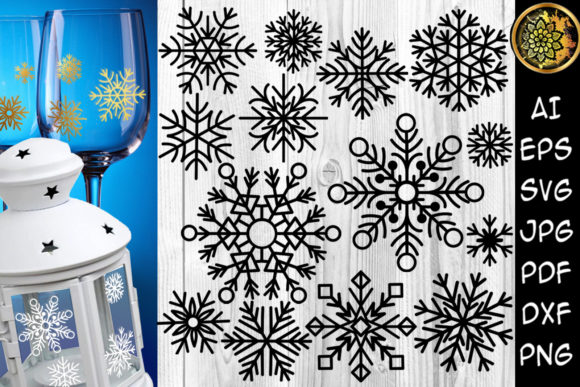
Christmas Snowflakes Clipart Set
When you decide to create your own holiday decorations, gifts, or apparel, a Christmas Snowflakes Clipart Set can feel like the perfect starting point. These digital files promise crisp, clean designs that you can drop into nearly any project. But many people pick up a set like this, open the zip file, and then hit a wall. The problem is rarely the clipart itself. It is almost always a mismatch between what the buyer expects and what the files are actually designed to do.
Understanding what you are buying and how to use it correctly makes the difference between a project you are proud to gift or sell, and one that ends up in the recycling bin. This article walks through the most common mistakes people make with snowflake clipart sets, how those mistakes affect your results, and what you should check before you even download the files.
Mistake Number One: Assuming All File Formats Are Interchangeable
A ZIP archive that includes AI, EPS, DXF, PDF, SVG, JPEG, and PNG files looks generous. It is. But each format serves a different purpose. The worst mistake you can make is treating them as interchangeable. If you try to open a DXF file in a photo editor, it will not work. If you try to use a JPEG for a cut file on a Cricut, you will get jagged edges and wasted material.
This misunderstanding leads to frustration. You might think the design is flawed, when really you are simply using the wrong tool. The JPEG and PNG versions are for print or digital display. They work great for card stock printing or sharing on social media. The SVG, DXF, and EPS files are for cutting machines and vector editing. They preserve the clean edges you need for vinyl, stencils, and iron-on transfers.
Practical advice: Before you start any project, decide what your output will be. If you are making a vinyl decal, open the SVG or DXF. If you are printing a card, use the PNG with transparent background. Keep the AI and EPS files as your master copies in case you need to adjust colors or merge designs later. Organizing by output type saves time and material.
Mistake Number Two: Not Checking the Vector Quality for Small Cuts
A snowflake design often has thin, intricate lines. Those fine details are beautiful on a computer screen, but they can become a problem when you scale them down. Many clipart sets are drawn at a standard size. If you shrink a snowflake to fit a small mug or a tumbler, the thinnest parts may become too narrow for your cutting machine to handle.
When a blade cannot follow the line accurately, you get lifted edges, broken pieces, or a design that simply will not weed properly. This is not a flaw in the clipart. It is a limitation of the material and the machine. However, you can avoid this by examining the file before you cut.
Better approach: Open the SVG file in your design software and zoom in on the thinnest lines. Compare their width to the blade size and material thickness you plan to use. If a line looks too delicate, consider using a larger version of the design or simplifying the snowflake. Many experienced crafters keep a small test cut file on hand. Cut a single snowflake on a scrap piece of vinyl before committing to a full sheet.
Realistic example: Imagine you are making personalized Christmas tumblers as gifts. You choose an intricate snowflake from the set and size it to fit a 12-ounce cup. The design looks perfect on screen. But when you cut it, the inner details tear away during weeding. Next time, you size the design slightly larger or choose a snowflake with thicker lines. The same set works fine once you adjust your expectations about scale.
Mistake Number Three: Ignoring the Color Versatility Built Into the Set
The product description states that all designs come in a black color version for easy color changes. This is a powerful feature, but many users misunderstand it. They see black on white and think the design is only usable in black. Or they try to change the color in the wrong file format and struggle.
Black vector files are actually the most flexible format for customization. When you open an SVG or EPS file, the black fill is a single solid color. In your design software, you can select that black and replace it with any color you want. Metallic gold for elegant ornaments. Soft silver for winter wedding decor. Bright red for kids’ craft projects. The black base gives you a clean starting point without embedded gradients or patterns that limit your choices.
Common oversight: People open the JPEG file to change the color and find they cannot remove the white background or that the color shift looks muddy. They blame the clipart. The solution is simple: always use the vector formats (AI, EPS, SVG, or DXF) when you need to change colors. The PNG file also works if you need a transparent background, but you will get the best results editing vector layers.
How to avoid this: When you receive the ZIP archive, create a folder called "Editable Masters" and place the AI, EPS, and SVG files there. Label them clearly so you remember which files to open when you want to change colors, rotate elements, or combine snowflakes.
Mistake Number Four: Overlooking the Range of Projects Beyond the Obvious
Most people see a snowflake clipart set and think immediately of window decals or T-shirts. Those are good projects, but they barely scratch the surface. The mistake here is not realizing how versatile these files are, which leads to missed opportunities, especially if you sell your crafts or run a small business.
Because the set includes multiple formats, you can use the same snowflake design in entirely different ways. The DXF file works for laser engraving on wood ornaments. The PDF file can be printed on card stock and used for layered scrapbooking pages. The SVG file is perfect for heat transfer vinyl on tote bags or aprons. The JPEG file can become a digital backdrop for your social media holiday posts.
Practical advice for entrepreneurs and hobbyists: List your materials before you start. If you have leftover adhesive vinyl, use the DXF or SVG. If you have blank coasters, use the DXF for engraving. If you have card stock and a good printer, use the PDF or PNG. By mapping the file format to your physical supplies, you reduce waste and maximize what you get from a single purchase.
Better approach: Keep a small notebook or digital document where you track which file type works best for each material in your studio. Over time, this reference will save you from guessing and testing repeatedly.
Mistake Number Five: Forgetting to Verify Compatibility Before Cutting
Cutting machines like Cricut Explore and Silhouette are powerful tools, but they are not universal. Each machine has preferred file types and software requirements. The Christmas Snowflakes Clipart Set is sold as compatible with these machines, but “compatible” does not mean automatic. You still need to import the file correctly.
A common error is trying to upload a PDF or JPEG directly into the cutting software and expecting it to cut perfectly. Those formats do not carry cut lines. The SVG or DXF format does. If you skip the step of selecting the right file type, you end up with print-only images that your machine cannot trace or cut.
What to check: Look at your software's import guide. Cricut Design Space accepts SVG files readily. Silhouette Studio prefers DXF or SVG. Make sure you choose the file format that matches your workflow. Also, verify that the file is not grouped or flattened in a way that prevents editing. The best sets keep elements separate so you can resize or rotate individual snowflakes without breaking the design.
Solution: When you first open the ZIP archive, load the SVG file into your cutting software and test a small cut. If the machine cuts the outline cleanly, you are good. If it tries to cut around the white space or misses lines, check that you imported a cut-ready file and not a print image. A two-minute test saves an hour of frustration during a busy craft session.
Mistake Number Six: Not Considering the Commercial Use Implications
Many creators buy these clipart sets intending to sell finished products at holiday markets or on Etsy. The mistake is assuming that all clipart sets allow commercial use. While this particular set is marketed for DIY projects, you must read the license terms included in the ZIP archive or on the product page. Some sets restrict the number of physical items you can sell, require attribution, or prohibit digital resale.
If you build a small business around snowflake decals and later discover your license does not cover commercial production, you risk having to stop sales or pay a penalty. That is a costly error that can damage your reputation with customers.
How to protect yourself: Before you download or purchase, confirm the license. Look for phrases like “commercial use allowed” or “unlimited physical products.” Save a copy of the license document in the same folder as your design files. If you are buying from a marketplace, check the seller’s policy on commercial use. When in doubt, send a message and ask. Responsible sellers appreciate the question and will clarify.
Example: A maker builds a line of Christmas-themed resin coasters. She uses a snowflake SVG from the set to create a layered effect. She sells the coasters at a local fair. Because the license permits commercial use for physical items, she is in the clear. Her only obligation is to not resell the digital file itself. Knowing this lets her price her coasters confidently without legal worry.
Practical Checklist Before You Start Your First Project
To avoid the mistakes above, run through this short checklist every time you open a new Christmas Snowflakes Clipart Set.
- Identify your final medium. Are you cutting vinyl, printing paper, or engraving wood? That determines which file format you open first.
- Open the vector file. Use the SVG or DXF for cutting. Use the PNG with transparent background for print.
- Scale the design appropriately. Check the thinnest lines. If they look fragile at your target size, either enlarge the design or choose a different snowflake.
- Change colors in the vector editor. Do not try to recolor the JPEG. Open the AI or SVG file, select the black fill, and replace it with your chosen color.
- Run a test cut on scrap material. Confirm that your machine reads the cut lines and that the design weeds cleanly before you cut final material.
- Confirm your license. Check that your intended use fits within the seller’s terms. Keep a copy of the license for your records.
Following these steps will save you time, material, and the disappointment of a failed project. The snowflake designs themselves are reliable. The problems come from how we set them up and apply them.
The Real Value of a Good Clipart Set
A well-made Christmas Snowflakes Clipart Set is not just a collection of pretty shapes. It is a toolkit that can adapt to vinyl decals, T-shirts, cups, stickers, card stock, and countless other projects. The black color version makes recoloring effortless. The variety of file formats means you are not locked into one machine or one material.
The people who get the most out of these sets are those who take a few minutes to understand what each file does. They do not blame the clipart when a cut fails. They check their scale, their material, and their file format. They keep their licenses organized. They test before they produce in bulk.
Whether you are a beginner making your first set of holiday gifts or a small business owner preparing for a busy season, this clipart set gives you a strong foundation. The mistakes are avoidable. The designs are flexible. The results depend on how thoughtfully you prepare.
Choose your file format with intention. Adjust your scale to match your material. Change your colors with the vector file. Respect your license. Test before you commit. That approach turns a simple snowflake design into a finished project that looks professional, lasts through the season, and leaves you ready to start your next idea.