How to Use Cute Christmas Clipart and Digital Paper for Stunning Holiday Projects
The holiday season is a time for creativity, and nothing captures the festive spirit quite like adorable Christmas designs. Whether you are a seasoned crafter, a small business owner, or a parent looking to make personalized gifts, cute Christmas clipart and digital paper offer endless possibilities. This article explores everything you need to know about these versatile digital assets, from what they are and how to use them, to practical tips for getting the most out of your purchase. By the end, you will understand why a well-made clipart set is a must-have for holiday projects like cards, nursery decor, scrapbook paper, T-shirts, and so much more.
What Exactly Is Cute Christmas Clipart and Digital Paper?
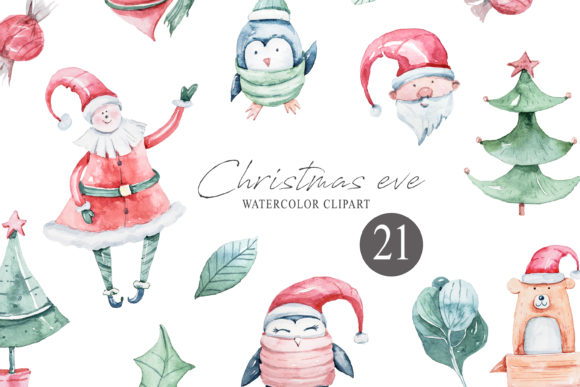
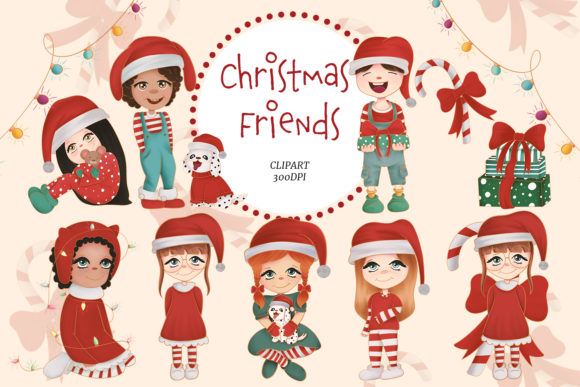
At its core, cute Christmas clipart refers to a collection of pre-designed illustrations featuring holiday-themed characters and elements. Think cheerful snowmen, grinning reindeer, jolly Santa faces, adorable penguins in scarves, twinkling ornaments, and festive treats like gingerbread cookies. These illustrations are typically provided as individual PNG files with transparent backgrounds, so you can place them seamlessly onto any surface—be it a card, a piece of fabric, or a website.
Digital paper, on the other hand, consists of patterned backgrounds that match the clipart set. These are often supplied as high-resolution JPG files, and they come in repeating patterns like plaid, polka dots, stars, or festive stripes. When you buy a bundle like the Cute Christmas Friends clipart set, you typically get both clipart and digital paper in one convenient zip file. This pairing allows you to create cohesive designs without needing to search for matching elements elsewhere.
Key Features to Look For in a Quality Clipart Set
Not all clipart is created equal. To ensure your projects turn out professional and polished, consider the following technical features, which are standard in a premium set:
- PNG files with transparent backgrounds: This lets you layer the clipart over any background color or pattern without ugly white boxes. It is essential for creating realistic composites in card making, scrapbooking, and T-shirt designs.
- High resolution at 300 DPI (dots per inch): This guarantees sharp, crisp images whether you print them at small sizes or blow them up for posters and wall decor. Low-resolution images look pixelated and amateurish.
- Digital patterns as JPG at 300 DPI: The patterned papers should be large enough to cover A4 or US letter size comfortably. They are ideal for printing as scrapbook paper, wrapping paper, or background for digital collages.
- Instant downloading: After payment is confirmed, you receive the zip file immediately via download link. No waiting for physical shipment. This is perfect for last-minute projects.
- ZIP file organization: A well-organized folder structure helps you quickly find the clipart or pattern you need without digging through hundreds of unnamed files.
Understanding these features helps you avoid disappointment and ensures you are investing in assets that work for both digital and physical applications.
Creative Ways to Use Cute Christmas Clipart and Digital Paper
The beauty of this clipart set lies in its versatility. Below, we break down the most popular and practical uses, with examples to inspire your next project.
1. Handmade Cards and Winter Stationery
Nothing says "I care" like a handmade holiday card. With cute Christmas clipart, you can design custom cards for family, friends, or clients. Use the PNG elements to create a scene on the front—perhaps a snowman holding a gift, surrounded by patterned paper from the digital pack. Because the clipart has a transparent background, you can layer multiple characters and embellishments. Winter stationery sets, including letterheads, note cards, and envelope liners, also become easy to produce when you have coordinated patterns and clipart at your fingertips.
2. Nursery Decor and Kids' Room Artwork
For parents, cute Christmas clipart is a dream for decorating a nursery or playroom during the holidays. You can print the characters on quality paper, frame them, and create a gallery wall featuring Santa, reindeer, and friendly elves. Since the designs are intentionally cute and non-scary, they are safe for even the youngest children. You can also use the digital paper as a background for a personalized growth chart or a festive name banner. The high resolution means the prints look great at larger sizes without losing detail.
3. Scrapbook Paper and Memory Keeping
Scrapbooking is all about preserving memories with style. The digital papers in this set work beautifully as background pages for your holiday-themed scrapbook. Print them on matte or glossy photo paper, then layer your clipart on top to highlight photos or journaling. Because the patterns coordinate with the clipart, your spreads will have a professional, unified look. You can also use the patterns for pocket page inserts, tags, and journaling cards.
4. T-Shirts and Textile Projects
Iron-on transfers and screen printing are popular ways to personalize apparel. Clipart with clear, bold lines and simple shapes works best for fabric. You can resize the PNG files to fit a toddler's onesie, a parent-child matching set, or a cozy holiday sweatshirt. Always test your transfer method on a scrap piece of fabric first to ensure the colors hold and the image does not crack. The 300 DPI resolution ensures that even small details remain sharp after transfer.
5. Home Decoration and Wall Art
Beyond the nursery, you can create seasonal decor for every room. Print clipart onto sticker paper to make custom wall decals that peel off easily after the holidays. Alternatively, create a festive gallery wall by framing individual clipart pieces alongside photos. Digital paper can be printed and used to line shelves, wrap small gifts, or cover gift boxes for a cohesive under-the-tree look. You might even use the patterns to decoupage onto wooden ornaments or trays.
6. Stickers, Labels, and Gift Tags
Stickers are always a hit with kids and adults alike. Use the clipart to create your own sticker sheets by printing on adhesive paper and cutting around each design. They are great for decorating envelopes, party favors, or handmade gifts. Matching gift tags are easy to make by printing the clipart on cardstock, cutting out the shapes, and adding a ribbon hole. You can also use the digital paper to create patterned labels for homemade jam, cookies, or bath salts—a thoughtful touch that makes your gift stand out.
7. Website Backgrounds and Digital Content
For bloggers, Etsy sellers, or social media creators, digital paper serves as an instant background for product photos, website headers, or Pinterest pins. Because the patterns are seamless (or nearly seamless), you can tile them as a site background or use them as a backdrop for flat-lay photography. The transparent PNG clipart can be placed directly into blog post images, email newsletters, or video thumbnails to add a festive feel without needing design software expertise.
8. Collages, Mixed Media, and Art Journaling
Artists and creative souls can incorporate clipart into digital collages or mixed-media pieces. Layer the PNG elements with textures, photos, and hand-drawn elements in software like Procreate, Photoshop, or Canva. Printing the clipart on textured paper and then painting over it creates an interesting hybrid of digital and traditional art. The possibilities are as broad as your imagination.
Practical Tips for Working with Digital Clipart and Patterns
To get the best results from your cute Christmas clipart set, keep these practical suggestions in mind:
- Always use high-resolution files for printing – The 300 DPI files are your go-to for any physical output. Reserving lower-resolution versions for digital use only prevents disappointment.
- Take advantage of transparent backgrounds – Use software like Canva, Photoshop, or even free alternatives like GIMP to layer clipart seamlessly. This feature is what separates professional-looking projects from cut-and-paste collages.
- Match patterns and clipart intentionally – The digital paper in the bundle is designed to complement the clipart. Use the patterns as backgrounds or accents, and let the clipart be the star. Avoid pairing busy patterns with complex clipart to maintain visual clarity.
- Test your printer settings – Before printing a full batch, run a single test page to check color accuracy, alignment, and resolution. Different paper types affect how colors appear.
- Store files in organized folders – After downloading, unzip your file and create subfolders for clipart, patterns, and any extras. This saves time when you are in the middle of a project.
- Understand licensing for commercial use – Most clipart sets come with terms of use. If you plan to sell items made with the clipart (like T-shirts or cards), verify that commercial use is allowed. When in doubt, contact the seller before purchasing.
Why This Clipart Set Is a Smart Investment for Creators
Purchasing a comprehensive bundle like the Cute Christmas Friends clipart set offers significant advantages over collecting random images from the internet. First, the stylistic consistency across all elements ensures your projects look cohesive. Second, having both clipart and matching digital paper reduces the time you spend hunting for complementary backgrounds. Third, the high resolution and transparent backgrounds give you professional-grade assets at a fraction of the cost of hiring a designer. For small business owners, educators, and hobbyists alike, such a set pays for itself after just a few projects.
Common Misunderstandings About Digital Clipart
There are a few assumptions that often trip up beginners. Let us clarify them:
- "Clipart is only for kids' projects." Not true. Modern clipart spans a wide range of styles, from whimsical and cute to elegant and minimalist. Many professional designers use clipart for branding, packaging, and social media.
- "You need expensive software to use clipart." While Photoshop offers advanced features, free tools like Canva, GIMP, and Photopea handle PNG layers and pattern placement perfectly well. You can even use basic Microsoft Word or PowerPoint for simple projects.
- "Digital files are delivered physically." Remember, this is a digital file. You download it immediately after purchase. There is no shipping, no waiting, and no cost for postage. This also means you need to back up your files.
- "All clipart is low resolution." High-quality sets specify 300 DPI for print and 72 or 150 DPI for web. Always check the product description. The set described here is explicitly high resolution, which is essential for printing on fabric, paper, or wall art.
Getting Started: What to Do After Purchase
Once you have downloaded your zip file, follow these simple steps to start creating:
- Unzip the folder on your computer (right-click and select "Extract All" on Windows or double-click on Mac).
- Browse the clipart and pattern folders to familiarize yourself with the contents.
- Open your preferred design software and drag a digital paper into the canvas as a background.
- Place a clipart PNG on top, resizing and rotating as needed.
- Add text, photos, or other embellishments if desired.
- Export your final design as a print-ready PDF or high-resolution JPG, and you are ready to print or share.
Remember, you can use the clipart for printing, collages, textile projects, wall decor, stickers, site backgrounds, and much more. The only limit is your creativity. If you have questions about using the clipart in specific ways, it is always a good idea to ask the seller before purchasing to ensure the license covers your intended use.
Conclusion
Cute Christmas clipart and digital paper are more than just decorative images—they are tools that empower you to create professional, heartfelt, and beautiful holiday projects. From handmade cards and nursery decor to T-shirts and scrapbook pages, the applications are vast and rewarding. By choosing a set that offers high-resolution PNG files with transparent backgrounds, coordinated digital patterns, and instant downloading, you set yourself up for success. Whether you are a beginner making your first card or an experienced creator running a holiday shop, these digital assets provide the quality and flexibility you need to bring your festive vision to life. So go ahead, download that zip file, and let your creativity shine this Christmas season.
If you have any questions about using the clip art for specific projects, please reach out to the seller before purchasing to ensure the set meets your needs. Happy crafting!