Christmas Retro Design Bundle: Vintage Holiday Graphics for Creators
When the holiday season approaches, designers and content creators often find themselves searching for fresh visuals that stand out from the usual stock imagery. The Christmas Retro Design Bundle offers a curated collection of vintage-inspired holiday assets that blend mid-century charm with modern practicality. Whether you are preparing seasonal promotions, social media graphics, or personalized greeting cards, this bundle provides a cohesive set of tools designed to save time while delivering a distinctive aesthetic.
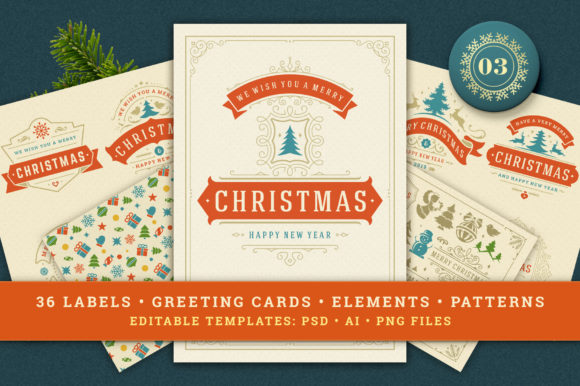
Volume 03 of the Christmas Retro Design Bundle expands on the series with an even richer assortment of typography elements, decorative ornaments, badges, labels, patterns, and greeting cards. The bundle is structured to support multiple workflows, making it suitable for both print and digital projects. Below, we explore what this collection includes, how it works across different software environments, and where it fits best in real-world creative work.
What the Christmas Retro Design Bundle Offers
At its core, this bundle is a modular design system built around retro holiday motifs. The assets are organized into three main categories: badges and labels, seamless patterns, and individual decoration elements. Each category comes in multiple file formats to accommodate users working in Adobe Photoshop, Adobe Illustrator, or those who prefer quick PNG placeholders.
Badges and Labels: Ready-to-Use Typography Assets
The bundle includes 36 badges and labels featuring retro typography and vintage ornamentation. These are provided as editable Adobe Photoshop files (with text layers and vector shapes) and Adobe Illustrator CS2 files (also editable and resizable). For users who need a flat, non-editable version, PNG files with transparent backgrounds at 3500x3500 pixels are included. This size works well for print materials like tags, stickers, or signage, as well as digital banners and social media posts.
The text in these files is fully editable in the Photoshop and Illustrator versions, which means you can replace the placeholder greetings with custom messages such as “Merry Christmas,” “Happy Holidays,” or brand-specific wishes. The vector shapes ensure that scaling up or down does not reduce quality, a critical feature for printing at different dimensions.
Patterns: Seamless Backgrounds for Consistent Branding
The pattern set contains six seamless designs in Photoshop and Illustrator formats, plus PNG versions with transparent backgrounds at 5000x5000 pixels. These patterns can be used to create wrapping paper, fabric prints, website backgrounds, or repeating elements in larger layouts. Because they are vector-based in the Illustrator files, you can adjust colors or scale the patterns without losing sharpness. The PNG versions offer a quick solution for users who do not need to modify the original design and simply want to drop a pattern into a project.
Decoration Elements: Individual Ornaments and Icons
A collection of decoration design elements is included, featuring vintage ornaments, stars, wreaths, ribbons, and other holiday motifs. These are offered as editable Photoshop and Illustrator files, as well as PNG files at 2500x2500 pixels with transparent backgrounds. The transparent PNGs are especially handy for layering over photos, creating collages, or adding quick embellishments to digital cards and flyers. The editable vector files give you full control over color, size, and arrangement, making it easy to build custom compositions from the ground up.
Greeting Cards: Print-Ready Templates
Three Christmas greeting card templates are included in the bundle. Each card is set up at 5x7 inches in CMYK color at 300 dpi, with editable text and vector shapes. Both Photoshop and Illustrator CS2 formats are available, so you can personalize the message and adjust the layout as needed. These templates are particularly useful for small businesses, churches, or community organizations that want professional-looking holiday cards without starting from scratch. The CMYK color space ensures that printed colors match what you see on screen, reducing the risk of disappointing results at the print shop.
Practical Applications Across Environments
The versatility of the Christmas Retro Design Bundle makes it relevant for a wide range of users. Below are some realistic scenarios where these assets can add value.
For Marketing and Small Business Owners
If you manage a retail store, café, or online shop during the holidays, you need consistent visuals across email campaigns, social media, and in-store signage. The badges and labels can be customized with your store’s name or a seasonal promotion, such as “Holiday Sale 20% Off.” The patterns can serve as backgrounds for product photos or as decorative borders on gift certificates. Because the files are layered and editable, you can maintain brand colors while incorporating the retro theme. A local bakery, for instance, could use the ornament elements to create custom cookie box labels that feel handcrafted and nostalgic.
For Freelance Designers and Creative Agencies
Freelancers who juggle multiple holiday projects will appreciate the time saved by having a unified set of assets. Instead of sourcing individual vector ornaments from different stock sites, the bundle provides a cohesive style that can be applied across client work. The Illustrator files are compatible with older versions of the software (CS2), so compatibility issues are minimized when sharing files with clients or collaborators. You can use the greeting card templates as a base for client proposals, adding company logos and custom messaging. The high-resolution PNG files also work well for mockups, allowing you to present concepts quickly without opening full editing software.
For Educators and Nonprofit Organizations
Schools, churches, and community groups often produce holiday newsletters, event flyers, and thank-you cards on limited budgets. The bundle’s editable formats mean that volunteers or staff with basic design skills can personalize materials without needing extensive training. A Sunday school class, for example, could edit the text on a greeting card to invite families to a Christmas pageant. The transparent PNG elements can be inserted into PowerPoint slides or Google Docs for simple announcements. The retro style adds a warm, familiar feel that resonates well with older audiences while still appealing to younger families.
For Bloggers and Content Creators
Bloggers and social media influencers need eye-catching visuals to maintain engagement during the busy holiday season. The decoration elements and badges can be used to create Pinterest pins, Instagram stories, or YouTube thumbnails with a unified look. Because the PNG files have transparent backgrounds, you can overlay them on photographs or existing graphics without additional masking. A lifestyle blogger might use the pattern files as a background for a gift guide post, while a food blogger could incorporate the ornament elements into a recipe card layout. The editable text in the badges allows for phrases like “My Favorite Holiday Recipes” or “Gift Ideas 2024.”
Key Strengths of the Bundle
Several qualities distinguish the Christmas Retro Design Bundle from generic holiday clip art collections.
- Multi-format support: The inclusion of Photoshop, Illustrator, and PNG files means you can work in your preferred environment without converting files or losing quality. The Illustrator CS2 compatibility is particularly valuable for users who have not upgraded to the latest subscription-based versions.
- Editable text and vectors: True customization requires the ability to change type and colors. The layered files preserve text as live type, so you can update messages without recreating the design. Vector shapes ensure that scaling does not introduce pixelation.
- High resolution across the board: From the 3500-pixel badges to the 5000-pixel patterns, the resolution supports print output up to poster size. This reduces the need to enlarge assets artificially, which often degrades quality.
- Unified retro aesthetic: The vintage style is consistent throughout the collection, so mixing badges, patterns, and ornaments in a single project produces a coherent look. This is harder to achieve when pulling assets from multiple sources with different design languages.
- Print-ready card templates: The greeting cards are set up with proper CMYK color, 300 dpi resolution, and 5x7 inch dimensions. These specs align with standard print industry requirements, saving you from file conversion errors.
Considerations When Using the Bundle
While the Christmas Retro Design Bundle offers considerable flexibility, a few practical points are worth noting before you begin a project.
First, the PNG files are not editable for text or vector shapes. If you anticipate needing to change a word or adjust a color, use the Photoshop or Illustrator versions. Plan your workflow accordingly: start with the editable files when customization is required, and use the PNG files only for final placements or quick mockups.
Second, the retro style is distinct and may not suit every brand or audience. If your holiday aesthetic leans modern or minimalist, blending these vintage elements with simpler typography and neutral backgrounds can help bridge the gap. The vector files give you the freedom to modify colors and remove decorative flourishes, so you are not locked into the original design.
Third, the bundle is designed for English-language greetings by default. If you need messages in other languages, you will need to edit the text manually. The Photoshop and Illustrator files make this straightforward, but it is worth checking that the fonts used support the characters you require. The files likely use standard system fonts or common typefaces, but confirming this early avoids last-minute adjustments.
Finally, the Illustrator files are saved in CS2 format, which opens in most modern versions of Adobe Illustrator (including the Creative Cloud releases). However, if you are using very old software, confirm that your version can read CS2 files. For the Photoshop files, the same compatibility consideration applies, though PSD files tend to be more forgiving across versions.
Making the Most of the Bundle
To get the best results with the Christmas Retro Design Bundle, start by browsing the full set of assets and identifying which elements match your project goals. If you are creating a series of social media posts, begin with the badges and labels as your primary focal points, then use the patterns and decoration elements as supporting backgrounds or accents. For print projects such as gift tags or greeting cards, work directly in the editable files to ensure your text and colors are finalized before exporting.
Consider creating a master color palette from the existing designs and applying it consistently across all your holiday materials. The vintage style often uses muted reds, greens, golds, and creams, but you can adjust these to align with your brand identity. Because the vector shapes are separate from the text, you can recolor individual elements without affecting the typography.
If you are collaborating with a team, set up a shared folder with the PNG versions for quick reference, while keeping the editable PSD and AI files in a separate working directory. This prevents accidental edits to the source files while still allowing team members to preview assets.
Final Thoughts on the Christmas Retro Design Bundle
The Christmas Retro Design Bundle, particularly Volume 03, delivers a practical collection of vintage holiday graphics that balance nostalgia with modern usability. The variety of formats, editable components, and print-ready templates make it a solid choice for anyone producing holiday content across digital and physical channels. Whether you are a seasoned designer looking to streamline your seasonal workflow or a small business owner creating holiday materials for the first time, this bundle provides a reliable foundation that can be adapted to your specific needs.
Investing in a cohesive set of assets like this one reduces the time spent searching for individual elements and helps maintain visual consistency across your holiday projects. By working with the editable files and taking advantage of the high-resolution outputs, you can produce professional-looking results that capture the warmth and charm of a retro Christmas.