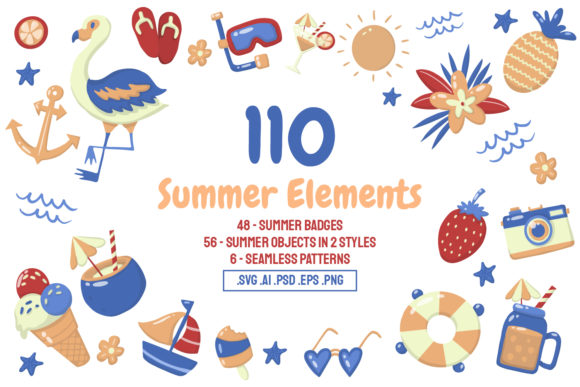
110 Summer Elements
Seasonal design projects come with a recurring challenge: creating fresh, cohesive visuals under tight deadlines while maintaining brand consistency. Whether you are producing social media campaigns, event collateral, or product packaging for summer promotions, starting every asset from scratch is rarely efficient. The 110 Summer Elements collection offers a structured alternative—a library of vector illustrations that can slot directly into your existing creative pipeline. This article walks through what the collection contains, how it fits into real-world workflows, and how to get the most out of it without disrupting your process.
What the Collection Includes
The bundle is organized around four visual asset types, each serving a different function in a typical design workflow:
- 48 Summer Badges – ready-to-use emblem-style graphics for branding, labels, stickers, and social media profile elements.
- 56 Summer Objects in Color Styles – detailed illustrated items such as sunglasses, ice cream, beach balls, and tropical drinks, fully rendered in palette.
- 56 Summer Objects in Outline Styles – the same objects in line-art form, suitable for coloring pages, stencil work, or when you need a lighter visual footprint.
- 6 Seamless Patterns – repeatable backgrounds for textiles, digital wallpapers, packaging wraps, or website sections.
All graphics are provided as 100% vector files, which means they remain resolution-independent whether you open them in Adobe Illustrator or Adobe Photoshop. The package includes .AI, .PSD, .SVG, .EP10, and .PNG formats, along with editable text layers and fully organized layer structures. A readme file contains links to any fonts used. Mockups are not included, but the assets themselves are production-ready.
Where 110 Summer Elements Fits in Your Process
This collection is not a complete design solution—it is a component library. That distinction matters because it defines how you integrate it. You do not build a project around these assets; you use them to accelerate specific phases of your existing workflow.
Consider three common insertion points:
- Before a project begins: During mood boarding and style exploration, the badge and object sets provide instant visual references. Instead of searching stock sites for hours, you can drop a few outline objects into a layout test to gauge scale, composition, and color direction before committing to custom illustration.
- During active production: When deadlines are tight, these elements serve as drop-in components for social media templates, email headers, flyers, or website hero sections. The layered AI and PSD files allow you to recolor, resize, and recombine without rebuilding geometry.
- After launch or during iteration: If a campaign needs mid-season refreshes—new badges for a flash sale, alternate object styles for A/B testing—the vector files make it possible to generate variations in minutes rather than hours.
This before-during-after framework helps you think of the collection as a toolkit rather than a finished product. You remain in control of composition and messaging; the assets handle the repetitive visual labor.
Preparing Your Workspace
Before you open any file, take ten minutes to set up your environment. The collection ships with well-organized layers and editable text, but your own template structure may differ. Create a master library file where you import the AI or SVG versions of all objects and badges. From that central file, you can drag individual elements into project documents without navigating subfolders repeatedly. If you use Adobe Creative Cloud Libraries, consider syncing the color variants as linked assets so updates propagate automatically.
Working with the Formats
The .AI files retain Illustrator-native features such as warp effects and envelope distortions. If you need those effects to remain editable, keep your work inside Illustrator. The .PSD files preserve layers and vector smart objects, making them suitable for Photoshop workflows, but certain Illustrator-specific features will appear flattened or rasterized. For maximum flexibility across both applications, rely on the .SVG or .EP10 versions as interchange formats—they preserve vector fidelity without application-specific dependencies.
If your team uses collaborative platforms like Figma or Sketch, convert the SVG objects into component instances. This allows multiple designers to reuse the same summer icon without duplicating files or worrying about version drift.
Quality Control Checks
Before deploying any asset in a client-facing deliverable, run three quick tests:
- Scale boundaries: Verify that each object and badge remains crisp at the largest size your project requires. Vector files theoretically scale infinitely, but complex outlines with many anchor points can behave unpredictably at extreme enlargements. Zoom to 2000% and inspect curves for unexpected kinks.
- Color consistency: The color objects use a specific palette. If your brand guidelines require different hues, use the global swatches in Illustrator or the color overlay options in Photoshop to adjust. Because the files are vector, you can replace colors in seconds without re-illustrating anything.
- Pattern tile alignment: The six seamless patterns are designed to repeat infinitely, but check the tile boundaries when you apply them to large surfaces. Some combinations of scaling and rotation can create visible seams if the tile size does not match your canvas dimensions.
For Social Media Managers and Content Creators
You need a steady stream of summer-themed posts, stories, and banners. Keep a template file that contains a grid of empty frames sized for Instagram, Facebook, and LinkedIn. Drag badges into corner positions for branding, place outline objects behind text areas for visual depth, and use the seamless patterns as background fills. Because the elements are vector, you can export each post at any resolution without quality loss. Rotate through the 56 color objects to avoid visual fatigue—no two posts need the same primary icon.
For Small Business Owners and Entrepreneurs
If you run a seasonal pop-up, a café with summer menu specials, or an e-commerce store with limited-time products, consistency across touchpoints matters. Use the badges for product labels, shop signage, and social media avatars. The outline objects work well for coloring activities or printable promotional materials that customers can take home. Since the files are editable, you can modify a badge to include your own business name or tagline without hiring a designer. The .PNG versions give you a quick export option when you need to upload something immediately, but always keep the AI or SVG master files for future edits.
For Educators and Hobbyists
Summer school programs, camp handouts, or personal craft projects benefit from the outline objects. Print them as coloring pages, use them as stencil templates for T-shirt painting, or incorporate them into digital worksheets. The vector format means you can resize each object to fit different paper sizes without pixelation. If you teach design basics, the well-organized layers make these files excellent teaching examples—students can inspect how each object is constructed, experiment with color changes, and learn about vector editing in a low-pressure context.
Long-Term Management and Reusability
A collection like this pays for itself the more you reuse it. To maximize long-term value, build a small asset management habit:
- Store the original downloaded files in a dedicated folder with subdirectories for badges, objects (color), objects (outline), and patterns. Do not modify the originals.
- Create a "working copy" folder where you place customized versions. If you recolor a badge for a specific campaign, save it with a descriptive filename (for example, badge_sale_yellow_orange_v1.ai).
- Maintain a simple spreadsheet or note file that tracks which elements you have used, in which projects, and what modifications were applied. This prevents duplicate work when you need a similar asset six months later.
- If you collaborate with others, store the master files in a shared cloud drive with version history enabled. The small upfront organization effort saves hours of searching and recreating later.
Because the assets are vector-based, they do not degrade over time. A file you modify today will open cleanly in future software versions as long as you stick with industry-standard formats like SVG and AI. Avoid converting everything to raster early in your workflow—keep as much editability as possible until the final export stage.
Compatibility Considerations
The collection is built primarily in Adobe Illustrator, so users of that application will experience the most seamless editing experience. Photoshop users can work with the PSD and PNG files, but should note that warp effects created in Illustrator are not editable in Photoshop. If your workflow relies heavily on Affinity Designer, CorelDRAW, or web-based editors, rely on the SVG or EP10 formats. These are widely supported across vector editing tools, though some advanced features like live text styling may require manual adjustment after import.
For teams mixing platforms, establish a rule: use SVG as the interchange format, and keep AI or PSD as the working format within each application. This avoids the common frustration of discovering that a gradient or effect does not translate between tools.
Making the Collection Work for You
The real value of 110 Summer Elements lies not in having 110 files, but in having a coherent visual language that you can deploy, adapt, and reuse across projects. The badges anchor your branding. The objects provide recognizable summer iconography. The patterns give you background options that do not distract from your message. Together, they form a system that reduces the time between idea and execution.
To integrate it smoothly, start small. Pick three objects and one badge that match your current project's tone. Build a single social media graphic or a small flyer. Once you see how quickly the asset layers compose, expand to larger deliverables. The vector foundation means you never have to worry about resolution, and the variety of formats means you can work in the tool you prefer. Over a full season of campaigns, the collection becomes a reliable reference point—a visual shorthand for summer that you can pull from without restarting the creative process each time.
If questions arise about specific file behavior or ideal use cases, reaching out to the collection creator directly is the fastest path to clarity. The assets are well-documented, but real-world projects always surface unique edge cases. Use the contact information provided, describe your workflow, and get a precise answer rather than guessing.
Summer design cycles move fast. Having a structured, editable, and versatile library of vector elements lets you keep pace without sacrificing quality. Whether you are a solo entrepreneur publishing daily content or a marketing team coordinating a multi-channel campaign, these 110 elements give you a starting point that is already aligned with the season.