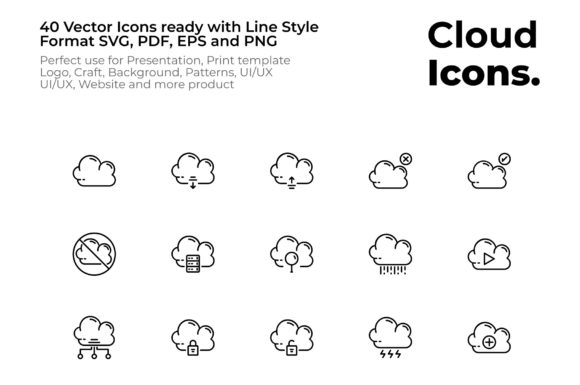
Cloud Collection Icon Set Line Style
Whether you are building a mobile app, designing a company profile, or crafting a presentation, having a reliable set of icons can streamline your workflow and elevate your visual identity. The Cloud Collection Icon Set Line Style is a versatile pack of vector icons designed around cloud computing and digital concepts, all rendered in a clean line style with an expanded stroke. This means each icon is easy to recognize at small sizes and remains crisp when scaled up, making it a practical choice for both screen and print projects.
The Core Appeal of Line Style Vector Icons
Line style icons have grown popular because they communicate ideas clearly without the distraction of heavy fills or complex gradients. The expanded stroke used in this collection adds a touch of weight, ensuring the icons read well even on busy backgrounds or in user interfaces with limited space. The Cloud Collection Icon Set Design Line Style Vector Icons focus on everyday cloud related tasks and states, from uploading data to managing cloud security. Because they are vectors, you can edit colors, adjust stroke thickness, or combine them with other graphics without losing quality.
Practical Benefits for Beginners and Professionals
If you are new to design, having icons in multiple formats removes the guesswork. This pack includes SVG, PDF, EPS, and transparent PNG files, so you can directly drop them into your project or open them in editing software. For seasoned creators, the expanded stroke ensures consistency across an entire set, which saves time when you need to unify a brand or interface. The icons are intentionally simple, so they work well in contexts where clarity matters, such as business cards, resumes, or UI elements for cloud storage apps.
Where and How to Use This Icon Set
The versatility of this collection means you can apply it in nearly any visual medium. Below are some common scenarios where the Cloud Collection Icon Set Line Style shines:
Digital Products and Interfaces
For mobile and desktop applications, icons need to scale across different screen sizes. The expanded stroke helps maintain legibility on smaller buttons or navigation bars. If you are designing a website for a cloud service provider, you can use the Download Data From Cloud, Upload Data To Cloud, and Cloud Database icons to guide users through features. The Search Cloud and Cloud Network symbols are perfect for dashboards or settings panels. Similarly, Cloud Wireless and Online Learning icons fit educational platforms or connectivity tools.
Print and Marketing Materials
Business cards, brochures, posters, and company profiles benefit from clean icons that communicate instantly. The Cloud Computing, Cloud Document, and Backup Cloud icons can represent services on a flyer or a presentation template. Because vector files like EPS and PDF are included, you can print them at any resolution without pixelation. For craft projects like stickers or patterns, the line style adapts well to cutting machines or screen printing, especially when you need a consistent look across many items.
Branding and Identity
Logos often require a simple yet memorable shape. The Cloud base icon or the Cloud Home variant can serve as a starting point for a brand mark. Cloud Account and Cloud Setting symbols work well for user profile sections in apps or websites. The expanded stroke gives the icons a modern, approachable feel that suits tech startups, consulting firms, or freelance designers who want a cohesive visual language across their resume, portfolio, and social media.
A Detailed Look at the Icon Library
The pack includes a wide range of cloud oriented symbols, all styled consistently. This makes it easy to mix and match without visual clashes. Here are some of the categories covered:
Core Cloud Actions and States
- Cloud – the base symbol for general use
- Download Data From Cloud and Upload Data To Cloud – for file transfer interfaces
- Enable Cloud and Disable Cloud – perfect for toggle controls
- Block Cloud and Danger Cloud – indicate restricted or hazardous states
- Cloud Protection and Warning Cloud – for security warnings
Weather and Environmental Contexts
Rain Cloud, Snow Cloud, Sunny Cloud, Cloud Night, and Lightning Cloud bring weather related variety to apps or dashboards. These are useful for weather widgets, outdoor event planning pages, or any project that needs a quick visual for atmospheric conditions.
Security and Access Icons
Lock Cloud, Unlock Cloud, Malware Cloud, and Cloud Account help represent authentication, privacy, and threat detection. You can use them in login screens, account settings, or security dashboards where users need to grasp risks or permissions at a glance.
Finance and Productivity
Online Money and Transfer Money icons are handy for fintech apps or ecommerce platforms. Cloud Document and Cloud Computing suit productivity tools, while Fast Cloud and Cloud Power suggest speed and efficiency. Cloud Idea can represent innovation or brainstorming within a creative platform.
Additional Utilities
The set also includes Ozone, Cloud Player, Cloud Mail, Cloud Location, Cloud Home, Cloud Setting, and Online Learning. These cover media playback, geolocation, smart home controls, and education. With so many options, you are likely to find an icon for almost any cloud related feature or service.
File Formats That Simplify Your Workflow
Having four common formats means you can jump straight into your project without converting files. Each format serves a different purpose:
- SVG – ideal for web and app interfaces; scales infinitely and can be animated or styled with CSS.
- PDF – great for sharing or printing, as it preserves vector data and is widely supported.
- EPS – a standard vector format for Adobe Illustrator and other professional design tools; useful for editing or further manipulation.
- Transparent PNG – ready to use in presentations, mockups, or social media graphics where a raster image is needed.
The expanded stroke is built into each file, so you get the same clean look whether you are coding a website, laying out a brochure, or designing a UI mockup. This consistency is especially valuable when you are working on a large project with multiple contributors.
What to Consider When Choosing an Icon Set
Before you commit to a collection, think about your specific needs. The Cloud Collection Icon Set Line Style works best if you require a uniform visual theme across many use cases. Since all icons share the same stroke weight and design language, they combine seamlessly. If you anticipate needing to heavily customize icons, the vector formats give you that freedom. For print projects, verify that the line thickness prints clearly at your intended size. The expanded stroke generally helps here, but it is always wise to test a sample at actual print dimensions.
Another factor is how you will organize the icons. Because the set includes many variants like Add Cloud, Remove Cloud, and Fast Cloud, you can quickly find what you need without sifting through unrelated symbols. This saves time during design sprints or when updating an existing product. If you later require a custom icon not in the pack, you can reach out to the creator for a tailored solution, which is a helpful option for growing brands.
Getting Started with the Icon Set
Using the files is straightforward. Download the folder, unzip it, and you will see subfolders for each format. Drag the SVG or PNG directly into your design software, or import EPS into vector editors. For web projects, you can embed SVG code or reference the files in your image directory. The transparency in the PNG files makes them instantly usable in mockups or slide decks. If you are creating a presentation template, the icons add a professional touch without requiring extra design work.
For a resume or company profile, consider pairing the Cloud Document or Cloud Setting icon with your personal branding. The consistent line style helps your materials look cohesive, whether they are viewed on screen or printed. Many users find that starting with a complete icon set like this one reduces the back and forth of searching for individual symbols that do not match.
If you have feedback or need a custom icon, the creator welcomes your input. This kind of responsiveness is valuable when you are building a product that relies on visual consistency. Whether you are a blogger enhancing your website, a small business owner preparing a brochure, or a developer refining an app interface, the Cloud Collection Icon Set Line Style provides a solid foundation for your visual communication.