Christmas Silhouette Clip Art for Creative Projects
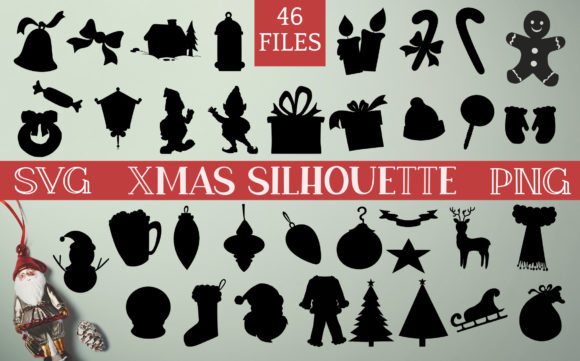
If you have ever searched for festive visuals that feel both classic and flexible, Christmas silhouette clip art offers a simple yet powerful solution. Unlike full-color illustrations, silhouette designs strip away unnecessary detail, leaving clean outlines that you can adapt to nearly any project. Whether you are a casual crafter working on handmade gifts or a small business owner creating seasonal marketing materials, these black-and-white shapes give you a sturdy foundation to build upon. The set includes 46 distinctive shapes spanning Santa, reindeer, ornaments, trees, stockings, gifts, candy, and more, all delivered as both SVG and PNG files. This means you can scale, recolor, layer, or combine them without losing quality. The real appeal lies in how much freedom you get: use the silhouettes as a background, fill them with patterns or doodles, layer other clip art on top, or keep them minimal for a clean, modern look. They work equally well for physical crafts like card making, vinyl cutting, and fabric printing, as well as digital projects such as social media graphics, website decorations, and printable planners.
What Makes Christmas Silhouette Clip Art So Useful
The main advantage of working with silhouette clip art is its versatility. Because the shapes are solid outlines, you are never locked into a specific color scheme or artistic style. A single silhouette of a Christmas tree can appear rustic when filled with a plaid pattern, elegant when left black on cream paper, or playful when combined with colorful doodles. This adaptability makes silhouette clip art especially appealing for people who need consistent visuals across different mediums. For example, an educator might use the same reindeer silhouette on a worksheet, a bulletin board decoration, and a digital slideshow without worrying about color mismatches or resolution issues.
Another key benefit is the time saved. Starting a design from scratch requires sketching, tracing, or digital drawing skills. With 46 ready-to-use shapes, you skip the laborious part and jump straight to customization. Beginners often find silhouettes less intimidating than detailed clip art because there is no pressure to match complex colors or shading. You can simply drop a Santa shape into your project and experiment with different backgrounds, textures, or overlays until it feels right. Professionals appreciate this efficiency too, especially during the busy holiday season when deadlines pile up.
Silhouette clip art also supports a wide range of creative goals. If your aim is to produce cohesive branding for a Christmas market stall or an online shop, using the same silhouette style across labels, tags, and social media posts creates a unified look without requiring a graphic design degree. If your goal is purely personal, like decorating your home or making gifts for family, the shapes give you a repeatable motif that ties everything together. The set includes enough variety to cover classic Christmas imagery—trees, stars, ornaments, candy canes, gifts, stockings—while also offering less common shapes that add surprise and personality.
Creative Ways to Use the 46 Shapes
The 46 silhouettes in this collection are not just standalone images; they are building blocks for larger compositions. Because the files come in both SVG and PNG formats, you have maximum flexibility depending on your software and project type. SVG files are vector-based, meaning you can resize them infinitely without pixelation, making them ideal for large banners, signs, or fabric printing. PNG files with transparent backgrounds work well for quick digital use, such as inserting into documents, presentations, or social media posts.
Personal and Home Projects
For home crafters, the possibilities are extensive. You can use the tree and ornament silhouettes to create customized gift wrap by printing them onto plain kraft paper. Layer different sizes of candy cane and gift shapes to design wrapping paper that looks curated rather than store-bought. If you own a cutting machine like a Cricut or Silhouette, the SVG files can be imported directly to cut adhesive vinyl for window decals, mugs, or tote bags. The clean outlines are ideal for this purpose because there are no tiny internal details that cause cutting errors.
Another idea is to use the shapes as stencils. Print the PNG files at your desired size, cut out the negative space, and use paint or spray ink to transfer the design onto wood signs, canvas, or fabric. The stocking and snowflake silhouettes work particularly well for this technique. You can also fill the outlines with patterns, such as polka dots, stripes, or even handwritten text, to create one-of-a-kind holiday cards or ornaments. Because there are 46 shapes, you can mix and match them to tell a visual story—for instance, pairing Santa with a gift and a tree on a single card layout.
For those who enjoy doodling or adult coloring, the silhouettes can serve as boundaries to fill with your own drawings. Print the shapes at a larger scale and use fine liners or markers to add intricate patterns inside the outline. This turns a simple silhouette into a meditative art activity and results in a piece that feels uniquely yours. The reindeer and ornament shapes are especially satisfying for this kind of detailed work.
Digital and Business Applications
Creators and small business owners can integrate the silhouettes into digital products such as printable planners, sticker sheets, or digital scrapbooking kits. Because the SVG files are scalable, you can create multiple sizes of the same shape without generating separate files. This is useful if you sell design resources on platforms like Etsy or Creative Market. The PNG versions with transparent backgrounds allow you to quickly drop a Christmas silhouette onto a social media graphic, a blog header, or a seasonal email newsletter without needing advanced software skills.
Marketers and bloggers often use silhouette clip art to add visual interest without overwhelming the text. A subtle tree or star silhouette behind headers can create a festive atmosphere while keeping the content readable. Since the shapes are simple, they load quickly on websites and look crisp on both desktop and mobile screens. You can also use them as bullet points in lists, as dividers between sections, or as accent elements in product photography. For example, placing a small gift silhouette next to a product name in an online store adds a holiday touch without being distracting.
Educators and freelancers can use the silhouettes in presentations, worksheets, or event flyers. A teacher preparing a holiday-themed lesson might use the candy and ornament shapes to create counting exercises or decoration patterns. A freelancer designing a flyer for a community Christmas fair can layer multiple silhouettes to build a scene, then add text in the negative space. Because the set includes Santa, reindeer, trees, and other iconic images, you can create a complete visual narrative with just a few elements.
Practical Tips for Getting the Most Out of Your Clip Art
To make the 46 shapes work effectively across different projects, there are a few practical points worth considering. First, because silhouettes rely on strong outlines, pay attention to contrast. A black silhouette on a dark background will lose its impact, so pair dark shapes with light backgrounds and vice versa. If you plan to use the silhouettes as backgrounds themselves, consider scaling them to a large size and reducing the opacity so they become subtle watermarks or texture layers. This works well for website backgrounds, printable stationery, or fabric patterns.
Layering is another technique that can greatly expand your creative options. Place a larger tree silhouette behind a smaller Santa shape to create depth. Overlay a star silhouette on a circular ornament shape for a combined motif. Since the files support transparent backgrounds, you can stack them in design software like Canva, Adobe Illustrator, or Affinity without any manual cleanup. For physical projects, you can layer vinyl cuts or stencils directly on top of each other, using different colors for each layer.
If you are new to working with SVG files, note that they are easy to edit in free software like Inkscape or online tools like Vectr. You can change the fill color, adjust the stroke, or even combine multiple SVG shapes into one design. For those who prefer working with PNG files, you can still resize them within reason, but keep in mind that raster images lose quality when scaled too large. A good practice is to start with the highest resolution PNG and scale down as needed.
Why SVG and PNG Files Matter
Including both SVG and PNG formats ensures that you can use the Christmas silhouette clip art regardless of your workflow. SVG files are essential for anyone who needs to resize designs constantly, such as when creating products in multiple sizes or when using a cutting machine. They also allow you to change colors quickly and maintain crisp edges at any scale. PNG files, on the other hand, are more accessible for everyday use. You can insert them directly into Word documents, Google Slides, or basic photo editors without needing vector software. The transparent background means they integrate seamlessly into layered designs.
Having both formats also future-proofs your collection. If you upgrade your software or switch to a different device later, you will still have a format that works. The 46 shapes cover a broad range of Christmas imagery, so you are unlikely to need additional assets for most projects. From Santa and reindeer to ornaments, trees, stockings, gifts, and candy, the essentials are all there.
Things to Consider Before You Start
Before diving into a project, take a moment to think about the final use. If you are creating physical items like decals or stencils, the SVG format will give you the best results because it works natively with cutting machines. If you are working purely digitally, PNG files may be sufficient, but keep in mind that you cannot change the fill color of a PNG without editing software that supports transparency. For maximum flexibility, use the SVG files whenever you need to modify the shape or color, and use the PNG files for quick placement when editing is not required.
Also consider the scale of your project. For large applications like banners or posters, vector files are indispensable because they maintain quality at any size. For small projects like card toppers or gift tags, either format works fine. If you plan to print on fabric, test the silhouette size on a sample first to ensure it reads well at the intended scale. Silhouettes with fine details may become muddy when printed on textured surfaces, so stick with simpler shapes for rough materials.
Finally, remember that these 46 shapes are a starting point. You can combine, rotate, flip, or overlap them to create entirely new designs. The silhouette style lends itself well to experimentation because mistakes are easy to fix. If a shape does not fit your vision, try scaling it differently or pairing it with another silhouette from the set. The value of having 46 options is that you can always find a combination that works, whether you are aiming for a minimalist look or a busy, festive collage.