Christmas 3 Designs Pine Tree Set 2: A Strategic Resource for Creative Entrepreneurs and DIY Professionals
If you create, design, or produce physical products for a living, you know that the difference between a project that feels effortless and one that drains your time often comes down to the quality of your source files. The Christmas 3 Designs Pine Tree Set 2 is not merely a collection of holiday graphics; it is a practical asset that can streamline your production workflow, improve consistency across product lines, and give you a reliable visual foundation for seasonal offerings. Whether you are a small business owner building a Christmas collection, a hobbyist refining your craft, or an educator preparing project materials, understanding how to use this set intentionally rather than randomly can save hours of editing time and elevate your final output.
This article walks through what this design set contains, why its file formats matter for real-world production, how to integrate it into your creative planning, and what to consider before using it in commercial or personal work. The focus is on practical strategy, not general inspiration.
What the Christmas 3 Designs Pine Tree Set 2 Actually Delivers
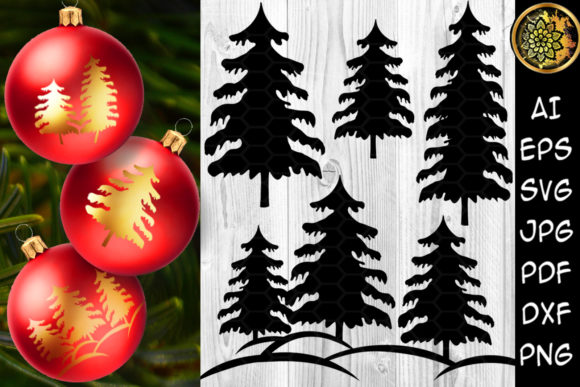
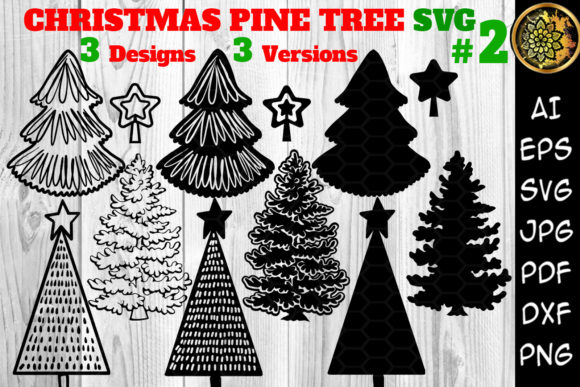
At its core, this set provides three distinct pine tree designs, each available in a consistent black color version. That black base is deliberate: it allows you to recolor the artwork in your editing software without quality loss or tedious selection work. For anyone producing branded merchandise, this means you can match your brand palette exactly rather than settling for a pre-colored graphic that clashes with your existing identity.
The ZIP archive includes the following files, and understanding each format's role can prevent costly mistakes at the cutting or printing stage:
- 3 AI files and 3 EPS files – Vector formats for professional design software such as Adobe Illustrator, Affinity Designer, or CorelDRAW. These allow infinite scaling and full editing capability.
- 12 DXF files – Widely used in CAD and cutting machine software. Useful if you work with older Silhouette models or specific laser engraving tools.
- 12 PDF files – Universal format for proofing, printing on card stock, or sending to clients for approval.
- 12 SVG files – The standard for Cricut Design Space, newer Silhouette Studio versions, and many web-based design tools. SVGs preserve clean cut lines and can be imported directly into most cutting machine software without conversion.
- 12 JPEG files and 12 PNG files with transparent backgrounds – Raster formats for mockups, social media previews, sublimation printing, or quick reference. PNG transparency is especially useful for layered designs where you need to see the product background through the image.
The sheer number of files (over 50) may appear overwhelming at first glance, but each format exists to solve a specific production problem. The strategic value lies in not having to convert or recreate files yourself, which reduces error risk and frees up time for higher-value tasks like product photography, marketing, or customer communication.
Why File Format Strategy Matters for Your Production Goals
One common mistake among creators is assuming all design files are interchangeable. They are not. Using a JPEG for a vinyl cut will result in jagged edges and poor weeding performance. Using an SVG intended for a Cricut in a laser engraver without checking the DXF version can lead to alignment failures. The Christmas 3 Designs Pine Tree Set 2 is structured so that each format corresponds to a specific workflow, and knowing which file to export from the archive can mean the difference between a smooth production run and a frustrating afternoon of troubleshooting.
For example, if you produce personalized tumblers and want to apply a pine tree decal using permanent vinyl, you should open the SVG file in your cutting machine software, check the scale, and cut. If instead you are screen printing a batch of T-shirts and need to separate colors, the AI or EPS file lets you isolate the tree outline and assign spot colors. If you are creating a mockup for an Etsy listing, the PNG file with transparency allows you to layer the design onto a product photo without additional clipping masks.
This type of format awareness is not technical overhead; it is operational efficiency. When you know exactly which file to reach for, you reduce decision fatigue and move from concept to finished product faster.
Strategic Applications Across Product Categories
The versatility of this design set becomes apparent when you map it against the product categories many small businesses and creators run simultaneously. Below are several use cases where thoughtful application of these pine tree designs supports specific business or creative goals.
Vinyl Decals and Home Decor Signage
If you sell seasonal home decor, pine tree decals are a staple. The three distinct designs allow you to offer variety without needing to source multiple artists. You could use one design for a window decal set, another for a layered wooden sign, and the third for a mini ornament decal. Because all designs come in black, you can easily assign different colors to each tree within the same sign composition, creating depth without manual tracing.
For large-scale sign production, the SVG or DXF format will give you clean cut paths that weed efficiently. Test your weeding on a small section first, especially with detailed tree branches, to ensure the design holds together under the vinyl's adhesive tension.
Apparel and Textile Products
For T-shirts, hoodies, and tote bags, these pine tree designs work well as single-color prints or as part of a larger holiday composition. The black base allows you to change the design color in your software to match the garment color or ink system you are using. Consider using one tree design as a central graphic on a sweatshirt and scaling down another for a sleeve or pocket print.
If you are heat pressing vinyl, ensure your SVG file has clean, continuous paths. If you are screen printing, the AI or EPS file gives you the vector control needed to create halftones or adjust line weights for different mesh counts.
Paper Crafting and Card Making
Card makers and scrapbookers often need designs that can be printed on card stock or cut with a precision blade. The PDF files in this set are ready to print, but you may get better results by importing the SVG into your cutting machine software and adjusting the cut settings for paper. The three distinct tree styles let you create a layered card front where each tree is cut from a different patterned paper, then assembled with foam tape for dimension.
For batch production of holiday cards, printing multiple copies from the PDF and cutting with a paper trimmer is efficient. For single custom cards, using the SVG with a cutting machine gives you tighter precision around branch details.
Mugs, Tumblers, and Drinkware
Sublimation printing on mugs and tumblers requires mirrored, high-resolution PNG files. The 12 PNG files with transparent backgrounds in this set are ready to be dropped into your sublimation design template. Because they are black, you can change the design color within your sublimation software to match the blank's coating or the customer's preference.
If you apply permanent vinyl to drinkware, the SVG format works best. Keep in mind that curved surfaces require slightly narrower designs to avoid lifting at the edges. Scale your tree design to about 60–70 percent of the tumbler's height for best adhesion and visual balance.
Stickers and Label Production
Sticker makers benefit from having both vector and raster formats. For kiss-cut stickers, the SVG file provides the cut line. For printed stickers on matte paper, the PNG file with transparency allows you to layer the tree over a background or pattern. The three designs can become a sticker sheet set, offering customers variety in a single purchase.
When selling sticker sheets, include all three designs on one sheet to increase perceived value. You can scale each tree differently to create a cohesive yet varied layout.
Planning Your Seasonal Product Line with This Design Set
Using a single design set across multiple product categories is a smart inventory strategy, but it requires upfront planning. Before you open any file, consider the following questions:
- Which product categories will carry these designs? If you sell apparel, home decor, and paper goods, you might use the same tree design in three different sizes and colors across all categories, creating a cohesive holiday collection.
- What is your color palette for the season? Because the designs come in black, you can batch-color them in your design software to match your chosen palette. This ensures consistency across mugs, shirts, and signs without rework.
- Which file format do your production tools require? If you use a Cricut, SVG is your primary format. If you use a laser engraver, DXF may be more reliable. Confirm your machine's preferred format before extracting files.
- How will you store and organize the files? Create a folder structure by format (SVG, PNG, AI, etc.) and within each folder, by design variation. Naming conventions like "Tree1_SVG," "Tree2_SVG," and "Tree3_SVG" will save time when you are in the middle of production.
Planning in this way transforms a design pack from a decorative asset into a production tool. It reduces the likelihood of using the wrong format, scaling incorrectly, or forgetting which design belongs to which product.
What to Consider Before Using the Designs in Commercial Projects
While the Christmas 3 Designs Pine Tree Set 2 is marketed for DIY and small business use, it is wise to clarify how you intend to use the files before launching a product line. If you sell physical products that incorporate these designs, you are generally on safe ground, but if you plan to redistribute the digital files themselves or include them in a digital design bundle, you may need to review the license terms provided by the seller. Most standard licenses for SVG and cut file sets allow unlimited physical product production but restrict digital redistribution.
If you are a print-on-demand seller, ensure your provider's file upload system supports the format you choose. Many POD platforms accept PNG files with transparent backgrounds, but some require SVG or PDF for cut lines. Testing a single product before scaling up can prevent expensive misprints.
There is also the question of design differentiation. Because these designs come from a publicly available set, other creators may use the same trees in their products. To stand out, combine the tree with your own typography, textures, or background elements. Change the color, add a snow effect, or pair the tree with a custom frame. The design set is a starting point, not a finished product. Your value as a creator comes from how you combine, contextualize, and present the artwork.
Risks of Using Design Files Without Clear Goals
It is easy to download a ZIP archive, open the files, and start cutting or printing without a clear plan. That approach can lead to several common problems:
- Inconsistent sizing – Using the same design at different scales across products without documenting the dimensions leads to a disjointed product line.
- Format confusion – Grabbing a JPEG when you need an SVG results in poor cut quality and wasted material.
- Color drift – Changing color in one product but forgetting to update others creates brand inconsistency.
- Overproduction – Making too many products in one design without testing market response ties up material and labor.
To avoid these risks, set simple rules before you begin. For example: "All drinkware will use Tree Design 1 at 4 inches wide in evergreen green. All apparel will use Tree Design 2 at 6 inches wide in white. All signs will use Tree Design 3 at 8 inches wide in dark brown." Document these decisions in a spreadsheet or notebook. When you have clear parameters, the design set becomes a reliable production element rather than a source of variability.
Long-Term Value and Reusability Across Seasons
While this set is themed for Christmas, pine tree designs have a longer seasonal life than many holiday graphics. With minor color adjustments, they can work for winter-themed products in January, evergreen decor in February, or even nature-inspired designs in spring. By changing the color from classic holiday green and red to neutral tones or metallics, you extend the set's usability beyond the Christmas window.
This kind of reusability matters for inventory planning. If you invest time in setting up your cutting files and templates for these designs in November, you can reuse those same template files with new colors for a winter collection in January. The upfront setup effort pays back multiple times if you design for reuse from the start.
Additionally, the vector formats (AI, EPS, SVG) are resolution-independent, which means they will not degrade over time as software updates or as you scale them for new product sizes. Properly archived, these files remain usable years later, making them a lasting part of your creative toolkit rather than a disposable seasonal asset.
Making the Set Work for Your Specific Workflow
Every creator's workflow is different, but there are a few universal steps that will help you get the most from this design set:
- Extract the ZIP archive and organize files by format and design. Create master folders for each format and subfolders for each tree design variation. This prevents you from digging through a single flat folder when you are under a deadline.
- Open each SVG file in your cutting software at least once before production. Check for stray nodes, overlapping paths, or scaling issues. Repair any problems in advance rather than during a production run.
- Create color variants as separate files. If you plan to offer the same design in three colors, duplicate the SVG file and change the color in each copy. Name the files clearly, such as "Tree1_Green.svg" and "Tree1_Red.svg."
- Build a product template library. For each product you produce regularly (mugs, T-shirts, signs), create a template file that already has the correct dimensions, bleed, and color space. Drop the tree design into the template rather than starting from scratch each time.
- Test one product before scaling. Cut or print one sample using the exact file you plan to use for production. Verify alignment, color, and durability. Make adjustments before producing in quantity.
These steps may seem basic, but they are exactly the kind of operational discipline that separates creators who consistently deliver quality from those who constantly troubleshoot. The design set is a tool; how you prepare and use it determines the outcome.
Final Thoughts on Using Design Assets Strategically
The Christmas 3 Designs Pine Tree Set 2 offers more than three pretty tree graphics. Provided in multiple industry-standard formats, with a black base for easy recoloring, it is a resource that can support a wide range of product categories if approached with intention. The strategic advantage does not come from the files themselves; it comes from how you organize, plan, and deploy them across your projects.
When you treat design files as production assets rather than decorative afterthoughts, you gain consistency, reduce waste, and free up creative energy for the aspects of your work that require genuine originality. Whether you are fulfilling a single custom order or preparing a seasonal collection for your online store, taking the time to match the right format to the right product, document your decisions, and plan for reuse will yield better results than any spontaneous cutting session ever could.
The tree designs are the raw material. Your system, your planning, and your attention to detail are what turn that raw material into something your customers will reach for and remember.